
Adding AI search and chat to a WordPress knowledge base, without an API key
By Hook & Plug · Published October 27, 2026
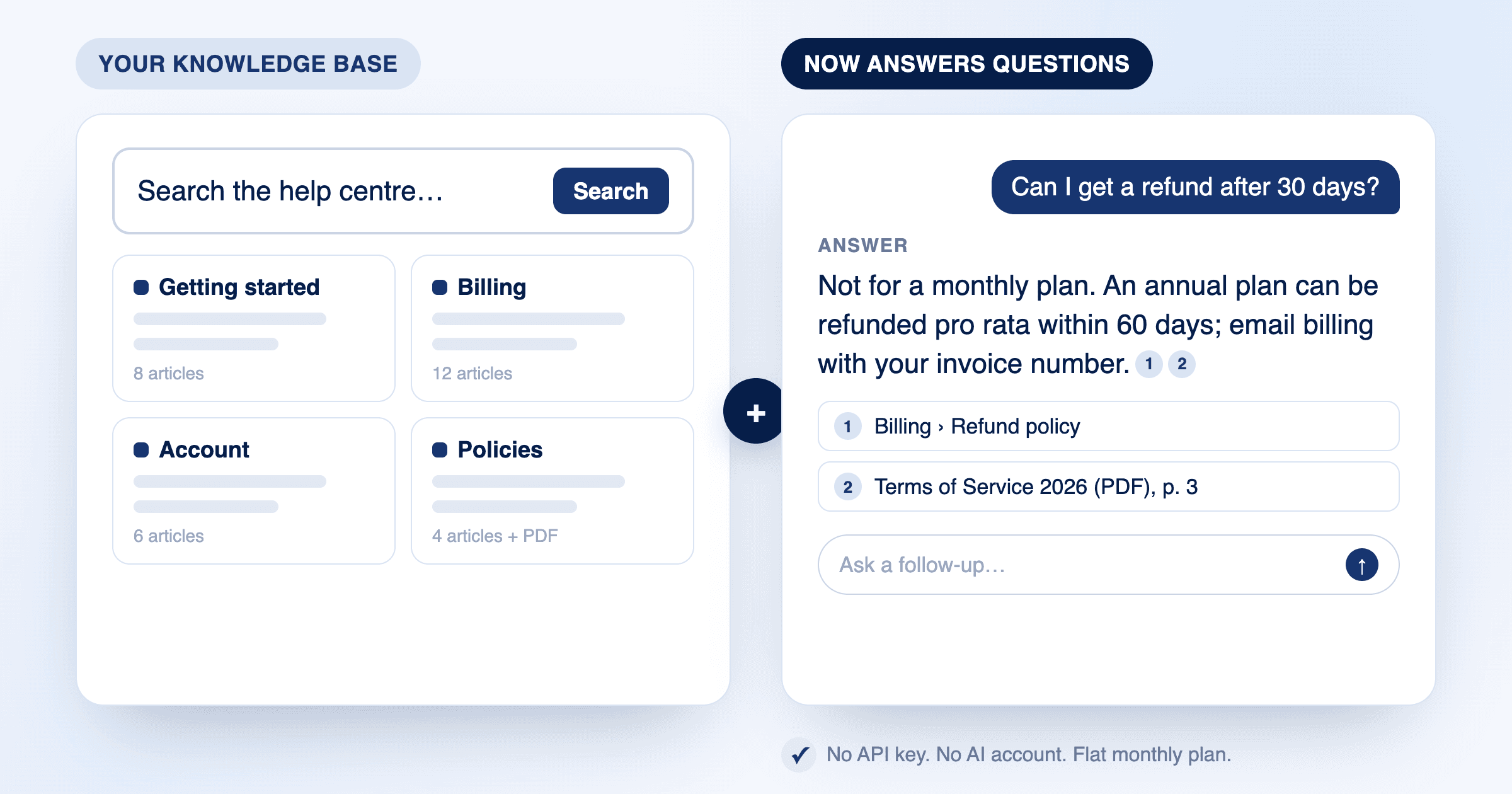
A knowledge base plugin gives your help centre a shape: categories, articles, a table of contents, breadcrumbs, a search bar. It is the right tool for writing and organising documentation. It is not, by itself, a way for a visitor to type "can I get a refund after 30 days?" and get the answer, with the article it came from.
This guide is for the person who already runs a documentation or help-centre site on WordPress, built with Echo Knowledge Base, BetterDocs, Heroic KB, weDocs, or simply pages, and wants it to answer questions. It covers the three ways to add that, what each asks of you, and how to set up the hosted one. We make AskMyPages, which is one of the three, so read the other two first.
Organising articles and answering questions are different jobs
A knowledge base plugin stores each article as a WordPress post of a custom type, groups them in categories, and adds a search bar that matches words in titles and content. That is the same word-matching the built-in search does, in a nicer box. A visitor who uses the words your article uses finds it; one who asks a question in their own words often does not.
An AI assistant does the second job: it reads the question, finds the passages that answer it by meaning rather than by matching words, writes a short answer from those passages, and links to them. The knowledge base is still where the content lives and where Google indexes it. The assistant sits on top.
The three ways to add that layer are the plugin's own AI features, a hosted assistant that indexes your site, and a standalone chatbot service. They differ mostly in who holds the AI account, what gets indexed, and how you are billed.
Option 1: the AI features built into your knowledge base plugin
Several knowledge base plugins now ship AI features. Echo Knowledge Base includes an AI chat and an AI search in its free version, switched off by default, and lists more in its paid add-ons. Others offer similar features in their Pro tiers; check the current feature list, since this changes often.
What they usually have in common, and what to check for your plugin:
- Bring your own key. Echo's AI features need an API key from OpenAI or Google, which means an account with that provider, a card on file there, and a second bill that depends on usage. You are the one who tops it up, sets limits and rotates the key.
- Scope. The assistant normally answers from the knowledge base articles only. Your other pages, your blog, and the PDFs in your Media Library are not part of it unless the plugin says so.
- Hosting the index. Some plugins send your articles to the provider at question time; others build an index on your own server and need a database that can hold it. Ask where the index lives and what happens when you change hosts.
- What it costs when a bot finds the chat. With a provider key, every question is a provider charge. Look for a per-day cap or a per-visitor limit in the settings.
Good fit when you want to stay inside one plugin, you are comfortable holding an OpenAI account, and the knowledge base is the only content the assistant should know about.
Option 2: a hosted assistant that indexes your whole site
A hosted service connects to your site, indexes the content you choose (knowledge base articles, pages, posts, PDFs), and runs the search and the chat for you with no AI account on your side. You pay the service a flat monthly amount; it pays the AI provider.
This is what AskMyPages does. It keeps your theme's search box and results page and makes them rank by meaning, puts a direct answer with numbered sources above the results, and adds an optional chat button on every page. Knowledge base articles are included like any other content, and so are the PDFs your articles link to, with the page number in the citation.
- No API key and no provider account. Install, click Connect, sign in with your email, tick the content types. About a minute.
- Knowledge base articles are a custom post type, which the Starter plan ($29 a month) indexes. The Free plan covers posts, pages and PDFs, so you can try it on a site whose help content is on pages first.
- Flat caps, never per-token bills. AI answers stop at the monthly cap or at a budget cap you set, and search keeps working.
- Answers come only from your content and cite it; when the content does not cover a question, it says so. Nothing is used to train AI models.
- Works alongside the knowledge base plugin, not instead of it. Your categories, layouts and article pages are untouched.
Good fit when the help content is spread across articles, pages and documents, when you do not want to run an OpenAI account, or when a predictable bill matters more than the last dollar of savings.
Option 3: a standalone chatbot service
Services such as DocsBot, Chatbase and their many peers crawl your public pages or take uploaded files, and give you a chat widget to paste into the site. They are not WordPress plugins and do not know about your knowledge base structure, your members, or your search box.
- Set-up is a crawl of your public URLs, so anything behind a login is invisible, and new articles appear when the next crawl runs.
- Chat only. Your search box stays as it was.
- Pricing is usually by message or by "credits", with the better models on the higher tiers.
- Good when the same bot must also serve a non-WordPress site, a Slack workspace or a help desk.
What to check before you choose
| Question | Built-in AI feature | Hosted assistant | Standalone chatbot |
|---|---|---|---|
| Who holds the AI account | You (API key) | The service | The service |
| What is indexed | Knowledge base articles | Articles, pages, posts, PDFs you choose | Public URLs or uploaded files |
| Members-only content | Depends on the plugin | Yes, by role | No |
| Your search box | The plugin's search bar | Upgraded in place | Unchanged |
| Billing | Plugin licence plus provider usage | Flat monthly, capped | Per message or credits |
| Leaves with you | Articles stay in WordPress | Articles stay; index deleted on disconnect | Articles stay; export varies |
Whichever you pick, ask two more questions: does the assistant answer only from your content and cite it, and what does it say when the content does not cover the question. An assistant that improvises is worse than no assistant on a help centre.
Setting up AskMyPages on an existing knowledge base, step by step
- Install AskMyPages from the Plugins screen and click Connect. You sign in with your email and are sent back to the plugin.
- On the Content tab, tick the knowledge base article type (for Echo it is listed under its own name; for others, the type the plugin registers) alongside pages, posts and PDFs. Custom types need the Starter plan; the plugin tells you so on the spot.
- Leave out what should not be answered from: internal categories, drafts of policy, the staff-only section. Each article also has a "leave this out" box.
- Wait for the first sync, a few minutes for a typical help centre. The Content tab shows what is searchable.
- On the Search tab, ask the questions your support inbox gets most. Check that each answer cites the right article. If the cited article is wrong, the article is usually the thing to fix.
- Decide where the chat appears: every page, only the help centre, or nowhere (the answer card on search results works without it).
Try it first on the live demo, a real WordPress site with a handbook and an agreement, before installing anything.
Questions people ask
- Do I need to replace my knowledge base plugin?
- No. Echo Knowledge Base, BetterDocs, Heroic KB and weDocs keep doing what they do. A hosted assistant indexes their articles as content and answers from them; your categories, layouts and URLs do not change.
- Does Echo Knowledge Base have AI chat?
- Yes. Its free version includes an AI chat and an AI search, off by default, and they need your own API key from OpenAI or Google. Paid add-ons extend them. Check the plugin's page for the current list.
- Why does a knowledge base article count as a custom post type?
- Knowledge base plugins register their own post type so articles can have their own categories, layouts and URLs. AskMyPages indexes posts, pages and PDFs on the Free plan and custom types on Starter and above.
- Can the assistant answer from PDFs my articles link to?
- With a hosted assistant that indexes the Media Library, yes: AskMyPages reads text PDFs and cites the page number. Built-in AI features generally read articles only; check your plugin.
- What happens when someone asks something the knowledge base does not cover?
- A good assistant says so and suggests contacting you. AskMyPages logs those questions for the site owner, which is a list of the articles still to write.